
Switch 7700 Configuration Guide, v2



264 CHAPTER 10: RELIABILITY
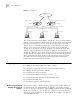
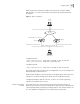
Figure 2 Virtual Router
This virtual router has its own IP address: 10.100.10.1, which can be the interface
address of a switch within the virtual router. The switches within the virtual router
have their own IP addresses, such as 10.100.10.2 for the Master switch and
10.100.10.3 for the BACKUP switch. The host on the LAN only knows the IP
address of this virtual router 10.100.10.1, but not the specific IP addresses
10.100.10.2 of the master switch and 10.100.10.3 of the backup switch. They
configure their own default routes using the IP address of this virtual router,
10.100.10.1. Therefore, hosts within the network communicate with the external
network through this virtual router. If a master switch in the virtual group breaks
down, another backup switch functions as the new master switch to continue
serving the host with routing and to avoid interrupting the communication
between the host and the external networks.
Configuring VRRP VRRP configuration tasks are described in the following sections:
■ Enabling and Disabling Pinging the Virtual IP Address
■ Setting the Correspondence between Virtual IP and MAC Addresses
■ Adding and Deleting a Virtual IP Address
■ Configuring the Priority of Switches
■ Configuring Preemption and Delay for a Switch
■ Configuring Authentication Type and Authentication Key
■ Configuring the VRRP Timer
■ Configuring a Switch to Track an Interface
Enabling and Disabling
Pinging the Virtual IP
Address
This operation enables or disables the ping function for the virtual IP address of
the backup group. The standard protocol of VRRP does not support the ping
function, so you cannot determine, with the ping command, whether the backup
group uses an IP address. If you configure the IP address for the host, that is the
same as the virtual IP address of the backup group, all messages in this segment
are forwarded to the host.
Network
Actual IP address 10.100.10.2
Master
Actual IP address 10.100.10.3
Backup
Virtual IP address 10.100.10.1Virtual IP address 10.100.10.1 Ethernet
Host 1 Host 2
Host 3
10.100.10.7
10.100.10.8
10.100.10.9