
Switch 7700 Configuration Guide, v2

Setting Terminal Parameters 19
Configure Redirection
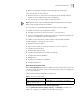
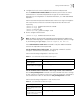
The send command can be used for sending messages between user
interfaces. See
Tab le 15.
Perform the following configuration in user view.
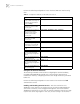
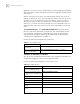
The auto-execute command is used to run a command automatically after
you log in. The command is automatically executed when you log in again. See
Tabl e 16.
This command is usually used to execute the telnet command automatically on
the terminal, which connects the user to a designated device.
Perform the following configuration in user interface view.
Note the following points:
■ After executing the auto-execute command, the user interface can no longer
be used to carry out the routine configurations for the local system. Use this
command with caution.
■ Make sure that you will be able to log in to the system in some other way and
cancel the configuration, before you use the auto-execute command and
save the configuration.
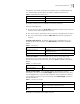
Telnet 10.110.100.1 after the user logs in through VTY0 automatically.:
[SW7700-ui-vty0] auto-execute command telnet 10.110.100.1
When a user logs on by VTY 0, the system will run telnet 10.110.100.1
automatically.
Display and Debug User Interface
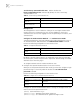
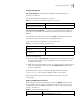
After creating the previous configuration, execute the display command in all
views to display the user interface configuration, and to verify the effect of the
configuration. Execute the free command in user view to clear a specified user
interface.
See Tab l e 17.
Table 15 Configure to Send Messages Between User Interfaces
Operation Command
Configure to send messages
between different user interfaces.
send { all | number | type number }
Table 16 Configure Automatic Command Execution
Operation Command
Configure to automatically run the
command
auto-execute command text
Configure not to automatically run
the command
undo auto-execute command
Table 17 Display and Debug User Interface
Operation Command
Clear a specified user interface free user-interface [ type ] number