
Switch 7700 Configuration Guide, v2

260 CHAPTER 9: AAA AND RADIUS OPERATION
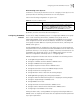
By default, RADIUS server group acknowledges that the username sent to it
includes ISP domain name.
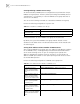
Setting the Unit of Data Flow that Transmitted to RADIUS Server
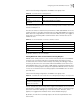
The following command defines the unit of the data flow sent to RADIUS server.
By default, the default data unit is byte and the default data packet unit is one
packet.
Configuring a Local RADIUS Server Group
RADIUS service adopts authentication/authorization/accounting servers to manage
users. Besides, local authentication/authorization/accounting service is also used in
these products and it is called local RADIUS function, i.e. realize basic RADIUS
function on the switch.
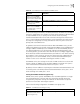
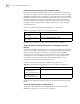
Perform the following commands in system view to create/delete local RADIUS
server group.
By default, the IP address of local RADIUS server group is 127.0.0.1 and the
password is 3com.
When using local RADIUS server function of the Switch 7700, remember the
number of UDP port used for authentication is 1812 and that for accounting is
1813.
Displaying and
Debugging the AAA and
RADIUS Protocols
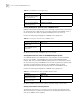
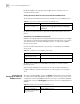
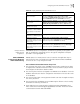
After you configure RADIUS, execute the display command in all views to display
the running of the AAA and RADIUS configuration, and to verify the effect of the
configuration. Execute the reset command in user view to reset AAA and RADIUS
configuration. Execute the debugging command in user view to debug AAA and
RADIUS.
Tab le 32 Set the Unit of Data Flow Transmitted to RADIUS Server
Operation Command
Set the unit of data flow
transmitted to RADIUS server
data-flow-format data [byte | giga-byte | kilo-byte |
mega-byte] packet [giga-byte | kilo-byte | mega-byte |
one-packet]
Tab le 33 Create/Delete a Local RADIUS Server Group
Operation Command
Create a local RADIUS server
group and enter its view
local-radius nas-ip ip-address key password
Delete a local RADIUS server
group
undo local-radius nas-ip ip-address
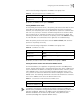
Tab le 34 Display and Debug AAA and RADIUS Protocol
Operation Command
Display the configuration
information of the specified or
all the ISP domains.
display domain [isp-name]