
Switch 7700 Configuration Guide, v2

Configuring the AAA and RADIUS Protocols 259
Perform the following configurations in RADIUS server group view.
By default, the RADIUS server type is standard.
Setting RADIUS Server State
For the primary and second servers, if the primary is disconnected to NAS for some
fault, NAS will automatically turn to exchange packets with the second server.
However, after the primary one recovers, NAS will not resume the communication
with it at once, instead, it continues communicating with the second one. When
the second one fails to communicate, NAS turns to the primary one again. The
following commands can be used to set the primary server to be active manually,
in order that NAS can communicate with it right after the troubleshooting.
When the primary and second servers are both active or block, NAS sends the
packets to the primary server only.
Perform the following configurations in RADIUS server group view.
By default, the state of each server in RADIUS server group is active.
Setting Username Format Transmitted to RADIUS Server
As mentioned above, the supplicants are generally named in userid@isp-name
format. The part following “@” is the ISP domain name. The Switch 7700 will put
users into different ISP domains according to the domain names. However, some
earlier RADIUS servers reject the username including ISP domain name. In this
case, you have to remove the domain name before sending the username to the
RADIUS server. The following command of switch decides whether the username
to be sent to RADIUS server carries ISP domain name or not.
If a RADIUS server group is configured not to allow usernames including ISP
domain names, the RADIUS server group shall not be simultaneously used in more
than one ISP domain. Otherwise, the RADIUS server will regard two users in
different ISP domains as the same user by mistake, if they have the same
username (excluding their respective domain names.)
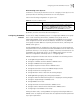
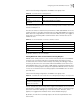
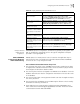
Table 29 Setting the Supported Type of RADIUS Server
Operation Command
Setting the Supported Type of
RADIUS Server
server-type {3ComType | iphotel | portal | standard}
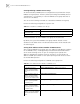
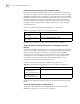
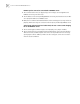
Table 30 Set RADIUS server state
Operation Command
Set the state of primary
RADIUS server
state primary {accounting | authentication} {block |
active}
Set the state of second
RADIUS server
state secondary{accounting | authentication} {block |
active}
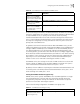
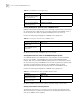
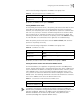
Table 31 Set Username Format Transmitted to RADIUS Server
Operation Command
Set Username Format
Transmitted to RADIUS Server
user-name-format {with-domain | without-domain}