
Switch 7700 Configuration Guide, v2

18 CHAPTER 1: SYSTEM ACCESS
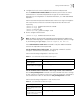
By default, a user can access the commands at Level 3 after logging in through the
AUX user interface, and the commands at Level 0 after logging in through the VTY
user interface.
When a user logs in to the switch, the command level that the user can access
depends on two points. One is the command level that the user itself can access,
the other is the set command level of this user interface. If the two levels are
different, the former is taken. For example, the command level of VTY 0 user
interface is 1, however, user Tom has the right to access commands of level 3; if
Tom logs in from VTY 0 user interface, he can access commands of level 3 and
lower.
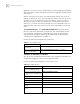
Set Command Priority The command-privilege level command sets the
priority of a specified command in a certain view. The command levels include
visit, monitoring, configuration, and management, which are identified with
command level 0 through 3, respectively. An administrator assigns authority
according to user requirements. See
Tabl e 13.
Perform the following configuration in system view.
Configure the Attributes of a Modem
You can use the commands described in Tabl e 14 to configure the attributes of a
modem when logging in to the switch through the modem.
Perform the following configuration in user interface view.
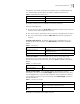
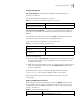
Tab le 13 Set Command Priority
Operation Command
Set the command priority in a
specified view.
command-privilege level level view view command
Restore the default command
level in a specified view.
undo command-privilege view view command
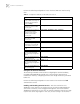
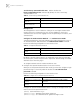
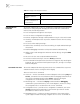
Tab le 14 Configure Modem
Operation Command
Set the interval since the system
receives the RING until CD_UP
modem timer answer seconds
Restore the default interval since
the system receives the RING until
CD_UP
undo modem timer answer
Configure auto answer modem auto-answer
Configure manual answer undo modem auto-answer
Configure to allow call-in modem call-in
Configure to bar call-in undo modem call-in
Configure to permit call-in and
call-out.
modem both
Configure to disable call-in and
call-out
undo modem both