
Switch 7700 Configuration Guide, v2

Configuring the AAA and RADIUS Protocols 251
Perform the following configurations in system view.
By default, there is no ISP domain in the system.
Configuring Relevant Attributes of an ISP Domain
The relevant attributes of ISP domain include the adopted RADIUS server group,
state, and maximum number of supplicants. Where,
■ The adopted RADIUS server group is the one used by all the users in the ISP
domain. The RADIUS server group can be used for RADIUS authentication or
accounting. By default, the default RADIUS server group is used. The command
is used together with the commands of setting RADIUS server and server
cluster. For details, refer to
“Configuring the RADIUS Protocol ”.
■ Every ISP has active/block states. If an ISP domain is in active state, the users in
it can request for network service, while in block state, its users cannot request
for any network service. An ISP is in the block state when it is created. No user
in the domain is allowed to request for network service.
■ Maximum number of supplicants specifies how many supplicants can be
contained in the ISP. For any ISP domain, there is no limit to the number of
supplicants by default.
■ The idle cut function means: If the traffic from a certain connection is lower
than the defined traffic, cut off this connection.
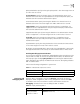
Perform the following configurations in ISP domain view.
By default, after an ISP domain is created, the used RADIUS server group is the
default named “default” (for relevant parameter configuration, refer to
“Configuring the RADIUS Protocol ”), the state of domain is active, there is no
limit to the amount of supplicants and disable the idle-cut.
Creating a Local User
A local user is a group of users set on NAS. The username is the unique identifier
of a user. A supplicant requesting network service may use local authentication
only if its corresponding local user has been added onto NAS.
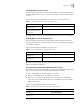
Table 13 Create/Delete ISP Domain
Operation Command
Create ISP domain or enter the
view of a specified domain.
domain [isp-name | default {disable | enable isp-name}]
Remove a specified ISP domain undo domain isp-name
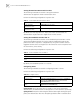
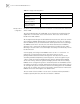
Table 14 Configure Relevant Attributes of ISP Domain
Operation Command
Specify the adopted RADIUS
server group
radius-scheme radius-scheme-name
Specify the ISP domain state to
be used
state {active | block}
Set a limit to the amount of
supplicants
access-limit {disable | enable max-user-number}
Set the idle idle-cut {disable | enable minute flow}