
Switch 7700 Configuration Guide, v2

246 CHAPTER 9: AAA AND RADIUS OPERATION
Example: 802.1x
Configuration
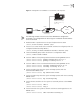
As shown in the following figure, the workstation is connected to the 1/0/2 of the
Switch 7700.
The switch administrator will enable 802.1x on all the ports to authenticate the
supplicants to control their access to the Internet. The access control mode is
based on the MAC address.
All the supplicants belong to the default domain 3com163.net, which can contain
up to 30 users. RADIUS authentication is performed first. If there is no response
from the RADIUS server, local authentication will be performed. For accounting, if
the RADIUS server fails to account, the user will be disconnected. In addition,
when the user is connected, the domain name does not follow the user name.
Normally, if the user’s traffic is less than 2kbps consistently over 20 minutes, he will
be disconnected.
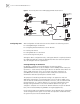
A server group, consisting of two RADIUS servers at 10.11.1.1 and 10.11.1.2
respectively, is connected to the switch. The former one acts as the
primary-authentication/second-accounting server. The latter one acts as the
secondary-authentication/primary-accounting server. Set the encryption key as
“name” when the system exchanges packets with the authentication RADIUS
server and “money” when the system exchanges packets with the accounting
RADIUS server. Configure the system to retransmit packets to the RADIUS server if
no response received in 5 seconds. Retransmit the packet no more than 5 times in
all. Configure the system to transmit a real-time accounting packet to the RADIUS
server every 15 minutes. The system is instructed to transmit the user name to the
RADIUS server after removing the user domain name.
The user name of the local 802.1x access user is localuser and the password is
localpass (input in plain text). The idle cut function is enabled.
Reset the 802.1x statistics
information
reset dot1x statistics [interface interface-list]
Enable the
error/event/packet/all
debugging of 802.1x
debugging dot1x {error | event | packet | all}
Disable the
error/event/packet/all
debugging of 802.1x.
undo debugging dot1x {error | event | packet | all}
Table 12 Display and Debug 802.1x
Operation Command