
Switch 7700 Configuration Guide, v2

IEEE 802.1x 245
quiet-period-value: Specify how long the quiet period is. The value ranges from 10
to 120 in units of second.
server-timeout: Specify the timeout timer of an Authentication Server. If an
Authentication Server has not responded before the specified period expires, the
Authenticator will resend the authentication request.
server-timeout-value: Specify how long the duration of a timeout timer of an
Authentication Server. The value ranges from 100 to 300 in units of second.
supp-timeout: Specify the authentication timeout timer of a Supplicant. If a
Supplicant has not responded before the specified period expires, Authenticator
will resend the authentication request.
supp-timeout-value: Specify how long the duration of an authentication timeout
timer of a Supplicant is. The value ranges from 10 to 120 in units of second.
tx-period: Specify the transmission timeout timer. If a Supplicant has not
responded before the specified period expires, Authenticator will resend the
authentication request.
tx-period-value: Specify how long the duration of the transmission timeout timer
is. The value ranges from 10 to 120 in units of second.
By default, the quiet-period-value is 60 seconds, the tx-period-value is 30 seconds,
the supp-timeout-value is 30 seconds, the server-timeout-value is 100 seconds.
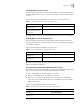
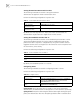
Enabling/Disabling Quiet-Period Timer
You can use the following commands to enable/disable a quiet-period timer of the
Switch 7700. If an 802.1x user has not passed authentication, the Authenticator
will keep quiet (specified by quiet-period) before launching the authentication
again. During the quiet period, the Authenticator does not do anything related to
802.1x authentication.
Perform the following configuration in system view.
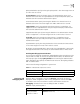
Displaying and
Debugging 802.1x
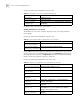
After the above configuration, execute the display command in all views to
display the VLAN configuration, and to verify configuration. Execute the reset
command in user view to reset 802.1x statistics information. Execute the
debugging command in user view to debug the 802.1x module.
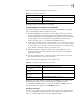
Table 11 Enable/Disable a Quiet-Period Timer
Operation Command
Enable a quiet-period timer. dot1x quiet-period
Disable a quiet-period timer undo dot1x quiet-period
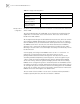
Table 12 Display and Debug 802.1x
Operation Command
Display the configuration,
running and statistics
information of 802.1x
display dot1x [interface-list] | [session | statistics]
{interface interface-list}