
Switch 7700 Configuration Guide, v2

IEEE 802.1x 243
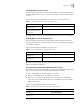
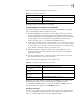
Setting Number of Users on a Port
The following commands are used for setting number of users allowed by 802.1x
on specified port. When no port is specified, all the ports accept the same number
of users.
Perform the following configurations in system view or Ethernet port view.
By default, 802.1x allows up to 1024 supplicants on each port for Switch 7700
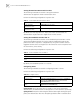
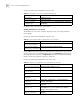
Enabling DHCP to Launch Authentication
Use the following commands for setting whether 802.1x enables the Ethernet
switch to launch the user ID authentication when the user runs DHCP and applies
for dynamic IP addresses.
Perform the following configurations in system view.
By default, authentication will not be launched when the user runs DHCP and
applies for dynamic IP addresses.
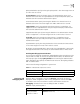
Configuring the Authentication Method for 802.1x Users
The following commands can be used to configure the authentication method for
802.1x users. Three kinds of methods authentication are available:
■ PAP — the RADIUS server must support this method
■ CHAP — the RADIUS server must support this method
■ EAP relay — the switch sends authentication information the the RADIUS
server int eh form of EAP packets directly so the RADIUS server must support
EAP authentication
Perform the following configuratins in system view.
Table 5 Set Maximum Number of Users by Specified Port
Operation Command
Set maximum number of users
by specified port
dot1x max-user user-number [interface interface-list]
Restore the maximum number
of users on the port to the
default value
undo dot1x max-user [interface interface-list]
Table 6 Set to Enable DHCP to Launch Authentication
Operation Command
Enable DHCP to launch
authentication
dot1x dhcp-launch
Disable DHCP to launch
authentication
undo dot1x dhcp-launch
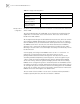
Table 7 Configure the Authentication Method for 802.1x Users
Operation Command
Configure the authentication method for
802.1x users
dot1x authentication-method { chap | pap
| eap md5-challenge}
Restore the default authentication method for
802.1x users
undo dot1x authentication-method