
Switch 7700 Configuration Guide, v2

Setting Terminal Parameters 17
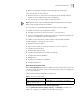
2 Configure the local or remote authentication username and password.
Use the authentication-mode scheme command to perform local or remote
authentication of username and password. The type of the authentication
depends on your configuration. For detailed information, see
“AAA and RADIUS
Operation”
Perform username and password authentication when a user logs in through the
VTY 0 user interface and set the username and password to zbr and 3Com
respectively:
[SW7700-ui-vty0] authentication-mode scheme
[SW7700-ui-vty0] quit
[SW7700] local-user zbr
[SW7700-user-zbr] password simple 3Com
3 Do not configure authentication
[SW7700-ui-vty0] authentication-mode none
Note: By default, the password is required for authenticating the modem and
Telnet users when they log in. If the password has not been set, when a user logs
in, the following message displays,
Password required, but none set.
If the authentication-mode none command is used, the modem and Telnet
users are not required to enter a password.
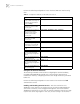
Set the Command Level after Login The following command is used for
setting the command level used after a user logs in.
Perform the following configuration in local-user view.
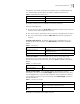
Set the Command Level Used after a User Logs in from a User Interface
Use the user privilege level command to set the command level after a user logs
in from a specific user interface so that a user is able to execute the commands at
that command level.
Tabl e 12 describes the user privilege level command.
Perform the following configuration in user interface view.
Table 11 Set Command Level Used After a User Logs in
Operation Command
Set command level used after
a user logging in
service-type telnet level level
Restore the default command
level used after a user logging
in
undo service-type telnet level
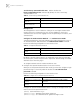
Table 12 Set Command Level after User Login
Operation Command
Set command level used after
a user logging in from a user
interface
user privilege level level
Restore the default command
level used after a user logging
in from a user interface
undo user privilege level