
Switch 7700 Configuration Guide, v2


Configuring MSTP 237
The port configured with root protection only plays a role of designated port on
every instance. Whenever such port receives a higher-priority BPDU, that is, it is
about to turn into non-designated port, it will be set to listening state and not
forward packets any more (as if the link to the port is disconnected). If the port has
not received any higher-priority BPDU for a certain period of time thereafter, it will
resume the normal state.
When you configure a port, only one configuration can be effective among loop
protection, root protection and edge port configuration at same time.
By default, the switch does not enable BPDU protection or Root protection.
For more about the configuration commands, see the Switch 7700 Command
Reference Guide.
Enabling MSTP on the
Device
You can use the following command to enable MSTP on the device.
Perform the following configuration in system view.
Only if MSTP has been enabled on the device will other MSTP configurations take
effect.
By default, MSTP is disabled.
Enabling or Disabling
MSTP on a Port
You can use the following command to enable or disable MSTP on a port. You
may disable MSTP on some Ethernet ports of a switch to spare them from
spanning tree calculation. This measure flexibly controls MSTP operation and saves
the CPU resources of the switch.
MSTP can be enabled/disabled on a port through the following ways.
Configuring in System View
Perform the following configuration in system view.
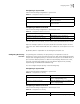
Table 40 Enable/Disable MSTP on a Device
Operation Command
Enable MSTP on a device. stp enable
Disable MSTP on a device. stp disable
Restore the disable state of MSTP, as
defaulted.
undo stp
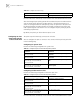
Table 41 Enable/Disable MSTP on a Port
Operation Command
Enable MSTP on a port. stp interface interface-list enable
Disable MSTP on a port. stp interface interface-list disable
Restore the default MSTP state on the port. undo stp interface-list