
Switch 7700 Configuration Guide, v2


234 CHAPTER 8: STP OPERATION
For more about the commands, see the Switch 7700 Command Reference Guide.
After the change of port priority, MSTP will recalculate the port role and transit the
state. A smaller value represents a higher priority. If all the Ethernet ports of a
switch are configured with the same priority value, the priorities of the ports will
be differentiated by the index number. The change of Ethernet port priority will
lead to spanning tree recalculation. You can configure the port priority by actual
networking requirements.
By default, the priority of all the Ethernet ports is 128.
Configuring the Port
Connection with the
Point-to-Point Link
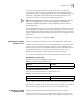
The point-to-point link directly connects two switches.
You can configure the port to connect or not connect with the point-to-point link
in the following ways.
Configuring in System View
Perform the following configuration in system view.
Configuring in Ethernet Port View
Perform the following configuration in Ethernet port view.
For more about the commands, see the Switch 7700 Command Reference Guide.
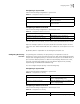
Restore the default port priority. undo stp instance instance-id port priority
Table 34 Configure the Port Priority
Operation Command
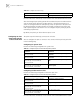
Tab le 35 Configure the port connection with the point-to-point link
Operation Command
Configure the port to connect with the
point-to-point link.
stp interface interface-list point-to-point
force-true
Configure the port not to connect with the
point-to-point link.
stp interface interface-list point-to-point
force-false
Configure MSTP to automatically detect if the
port is directly connected with the
point-to-point link.
stp interface interface-list point-to-point
auto
Configure MSTP to automatically detect if the
port is directly connected with the
point-to-point link, as defaulted.
undo stp interface interface-list
point-to-point
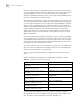
Tab le 36 Configure the port connection with the point-to-point link
Operation Command
Configure the port to connect with the
point-to-point link.
stp point-to-point force-true
Configure the port not to connect with the
point-to-point link.
stp point-to-point force-false
Configure MSTP to automatically detect if the
port is directly connected with the
point-to-point link.
stp point-to-point auto
Configure MSTP to automatically detect if the
port is directly connected with the
point-to-point link, as defaulted.
undo stp point-to-point