
Switch 7700 Configuration Guide, v2

232 CHAPTER 8: STP OPERATION
Configuring a Port as an
Edge Port
An edge port refers to the port not directly connected to any switch or indirectly
connected to a switch over the connected network.
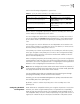
You can configure a port as an edge port or non-edge port in the following ways.
Configuring in System View
Perform the following configuration in system view.
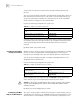
Configuring in Ethernet Port View
Perform the following configuration in Ethernet port view.
For more about the commands, see the Switch 7700 Command Reference Guide.
After it is configured as an edge port, the port can transit rapidly from a blocking
state to a forwarding state without any delay. In the case that BPDU protection has
not been enabled on the switch, the configured edge port will turn into non-edge
port again when it receives BPDU from the other port. In case BPDU protection is
enabled, the port will be disabled. The this parameter is configured the same and
takes effect on all the STIs.
It is better to configure the BPDU protection on the edge port, so as to prevent the
switch from being attacked.
Before BPDU protection is enabled on the switch, the port runs as a non-edge port
when it receives BPDU, even if the user has set it as an edge port.
By default, all the Ethernet ports of the switch have been configured as non-edge
ports.
Configuring the Path
Cost of a Port
Path cost is related to the speed of the link connected to the port. On the MSTP
switch, a port can be configured with different path costs for different STIs. Thus
the traffic from different VLANs can run over different physical links, thereby
implementing the VLAN-based load-balancing.
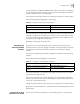
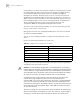
You can configure the path cost of a port in the following ways.
Tab le 29 Configure a Port as an Edge Port or a Non-edge Port
Operation Command
Configure a port as an edge port. stp interface interface-list edged-port
enable
Configure a port as a non-edge port. stp interface interface-list edged-port
disable
Restore the default setting, non-edge port, of
the port.
undo stp interface interface-list edged-port
Tab le 30 Configure a Port as an Edge Port or a Non-edge Port
Operation Command
Configure a port as an edge port. stp edged-port enable
Configure a port as a non-edge port. stp edged-port disable
Restore the default setting, non-edge port, of
the port.
undo stp edged-port