
Switch 7700 Configuration Guide, v2

Configuring MSTP 225
■ Configuring the Bridge Priority for a Switch
■ Configuring the Max Hops in an MST Region
■ Configuring the Switching Network Diameter
■ Configuring the Time Parameters of a Switch
■ Configuring the Max Transmission Speed on a Port
■ Configuring a Port as an Edge Port
■ Configuring the Path Cost of a Port
■ Configuring the Priority of a Port
■ Configuring the Port Connection with the Point-to-Point Link
■ Configuring the mCheck Variable of a Port
■ Configuring the Switch Security Function
■ Enabling MSTP on the Device
■ Enabling or Disabling MSTP on a Port
■ Displaying and Debugging MSTP
Only after MSTP is enabled on the device will other configurations take effect.
Before enabling MSTP, you can configure the related parameters of the device and
Ethernet ports, which will take effect upon enabling MSTP and stay effective even
after resetting MSTP. The check command can show the region parameters yet to
take effect. The display active-region-configuration command shows the
parameters that are configured before MSTP is enabled. For those configured after
MSTP is enabled, you can use the related display commands to display. For
detailed information, see
“Displaying and Debugging MSTP”.
You do not have to perform all these tasks to configure MSTP. Many of them are
designed to adjust the MSTP parameters provided with default values. You can
configure these parameters depending on your actual conditions or simply take
the defaults. For more detailed information, refer to the task description or to the
command descriptions in the Switch 7700 Command Reference Guide.
Configuring the MST
Region for a Switch
The MST region that a switch belongs to is determined with the configurations of
the region name, VLAN mapping table, and MSTP revision level. You can perform
the following configurations to put a switch into an MST region.
Entering MST region view
Perform the following configuration in system view.
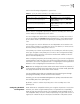
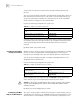
Table 18 Enter MST Region View
Operation Command
Enter MST region view (from system view) stp region-configuration
Restore the default settings of MST region undo stp region-configuration