
Switch 7700 Configuration Guide, v2

224 CHAPTER 8: STP OPERATION
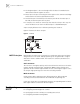
■ The designated port is the one through which the data is forwarded to the
downstream network segment or switch.
■ Master port is the port connecting the entire region to the common root bridge
and located on the shortest path between them.
■ An alternate port is the backup of the master port. When the master port is
blocked, the alternate port takes its place.
■ If two ports of a switch are connected, there must be a loop. In this case, the
switch will block one of them. The blocked port is called BACKUP port.
A port can play different roles in different spanning tree instances.
Figure 6 illustrates the these concepts.
Figure 6 Port Roles
MSTP Principles MSTP divides the entire Layer 2 network into several MST regions and calculates
and generates CST for them. Multiple spanning trees are generated in a region
and each of them is called an MSTI. The instance 0 is called IST, and others are
called MSTI.
CIST calculation
The CIST root is the highest-priority switch elected from the switches on the entire
network through comparing their configuration BPDUs. MSTP calculates and
generates an IST in an MST region and also the CST connecting the regions. CIST is
the unique single spanning tree of the entire switching network.
MSTI calculation
Inside an MST region, MSTP generates different MSTIs for different VLANs
according to the association between the VLAN and the spanning tree.
In this way, the packets of a VLAN travel along the corresponding MSTI inside the
MST region and the CST between different regions.
Configuring
MSTP
Configuring MSTP includes tasks that are described in the following sections:
■ Configuring the MST Region for a Switch
■ Specifying the Switch as Primary or Secondary Root Switch
■ Configuring the MSTP Running Mode