
Switch 7700 Configuration Guide, v2

202 CHAPTER 7: QOS/ACL OPERATION
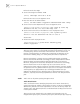
The steps to control TELNET users with ACL are described in the following
sections:
■ Define ACL
■ Call ACL to Control TELNET Users
Define ACL
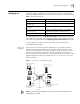
To implement the ACL control function, you can only call the numbered basic ACL,
ranging from 1 to 99.
Perform the following configuration in system view.
In the defining process, you can configure several rules for an ACL, using the rule
command repeatedly.
Call ACL to Control TELNET Users
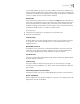
To control TELNET users with ACL, you can call the defined ACL in user-interface
view.
You can use the following command to call an ACL.
Perform the following configuration in the designated view.
For more information about the command, see the Switch 7700 Command
Reference Guide.
Note: Only the numbered basic ACL can be called for TELNET user control.
Example: Controlling
TELNET Users with ACL
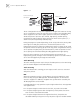
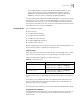
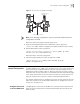
Figure 4 illustrates a configuration that controls TELNET user with ACL.
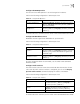
Tab le 18 Define Basic ACL
Operation Command
Enter basic ACL view (from system
view)
acl { number acl-number | name acl-name basic ip } [
match-order { config | auto } ]
Add a sub-item to the ACL(from
basic ACL view)
rule [ rule-id ] { permit | deny } [ source source-addr
source-wildcard | any ] [ fragment ] [ time-range name
]
Delete a sub-item from the ACL
(from basic ACL view)
undo rule rule-id [ source ] [ fragment ] [ time-range ]
Delete one ACL or all the ACL
(from system view)
undo acl { number acl-number | name acl-name | all }
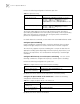
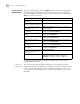
Tab le 19 Call ACL to Control TELNET Users
Operation Command
Enter user-interface view (from
system view)
user-interface [ type ] first-number [ last-number ]
Call an ACL (from
user-interface view)
acl acl-number { inbound | outbound }