
Switch 7700 Configuration Guide, v2

200 CHAPTER 7: QOS/ACL OPERATION
Displaying and
Debugging QoS
After you configure QoS, execute the display command in all views to display the
running of the QoS configuration, and to verify the effect of the configuration.
Execute the reset command in user view to clear the statistics of the QoS module.
For output and description of the related commands, see the Switch 7700
Command Reference Guide.
Example: QoS
Configuration
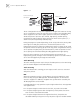
The interconnection between different departments on a company network is
implemented through the 100M ports of the Ethernet Switch. The payment query
server of the Financial Department is accessed by Ethernet1/0/1 (at 129.110.1.2).
It is necessary to limit the traffic from the server to other department to no more
than 20M.
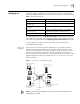
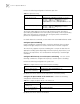
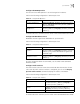
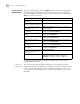
Tab le 17 Display and Debug QoS
Operation Command
Display port mirroring
configuration
display mirroring-group [groupid]
Display the mapping relationship
between cos and local precedence
display qos cos-local-precedence-map
Display the parameter settings of
all the QoS actions
display qos-interface [ interface-name | interface-type
interface-num ] all
Display the queue scheduling mode
and parameter
display qos-interface [ interface-name | interface-type
interface-num ] queue-scheduler
Display the parameter settings of
rate limit
display qos-interface [ interface-name | interface-type
interface-num ] traffic-limit
Display the settings of priority tag display qos-interface [ interface-name | interface-type
interface-num ] traffic-priority
Display information about the
traffic
display qos-interface [ interface-name | interface-type
interface-num ] traffic-statistic
Display the information about the
bandwidth assurance
display qos-interface [ interface-name | interface-type
interface-num ] traffic-bandwidth
Display the information about the
RED operation
display qos-interface [ interface-name | interface-type
interface-num ] traffic-red
Display the settings of priority used
for putting the packet to the
sending queue
display priority-trust
Clear the statistics information reset traffic-statistic { inbound | outbound } { all |
ip-group { acl-number | acl-name } [ rule rule ] |
link-group { acl-number | acl-name } [ rule rule ] }