
Switch 7700 Configuration Guide, v2

QoS Overview 199
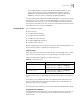
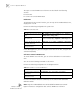
Configure the RED Operation
The function of the RED Operation is to avoid congestion in advance.
Perform the following configuration in Ethernet port view.
For details about the command, see the Switch 7700 Command Reference Guide.
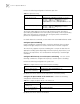
Configure Bandwidth Assurance
Bandwidth Assurance guarantees bandwidth for specified traffic.
Perform the following configuration in Ethernet port view.
For more information about the commands, see the Switch 7700 Command
Reference Guide.
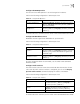
Configure Traffic Statistics
The traffic statistics function counts the transmitted data that matches the ACL
rules. After the traffic statistics function is configured, you can use the display
qos-info traffic-statistic command to display the statistics information.
Perform the following configuration in Ethernet port view.
For details about the command, see the Switch 7700 Command Reference Guide.
Table 14 Configure RED Operation
Operation Command
Configure RED Operation traffic-red outbound { ip-group { acl-number | acl-name } [
rule rule ] | link-group { acl-number | acl-name } [ rule rule ] }
qstart qstop probability
Cancel the configuration of
RED Operation
undo traffic-red outbound { ip-group { acl-number |
acl-name } [ rule rule ] | link-group { acl-number | acl-name }
[ rule rule ] }
Table 15 Configure Bandwidth Assurance
Operation Command
Configure bandwidth
assurance.
traffic-bandwidth outbound { ip-group { acl-number |
acl-name } [ rule rule ] | link-group { acl-number | acl-name }
[ rule rule ] } min-guaranteed-bandwidth max-guaranteed-
bandwidth weight
Cancel the configuration of
bandwidth assurance.
undo traffic-bandwidth outbound { ip-group { acl-number
| acl-name } [ rule rule ] | link-group { acl-number | acl-name }
[ rule rule ] }
Table 16 Configure Traffic Statistics
Operation Command
Configure traffic statistics traffic-statistic { inbound | outbound } { ip-group {
acl-number | acl-name } [ rule rule ] | link-group {
acl-number | acl-name } [ rule rule ] }
Cancel the configuration of traffic
statistics
undo traffic-statistic { inbound | outbound } {
ip-group { acl-number | acl-name } [ rule rule ] |
link-group { acl-number | acl-name } [ rule rule ] }
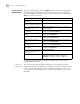
Display the statistics information display qos-info traffic-statistic