
Switch 7700 Configuration Guide, v2

198 CHAPTER 7: QOS/ACL OPERATION
Perform the following configuration in Ethernet port view.
The Switch 7700 supports a function to tag the packets with IP precedence
(specified by ip-precedence in the traffic-priority command), or DSCP (specified by
dscp in the traffic-priority command). You can tag the packets with different
priorities at requirements on QoS policy.
For details about the command, see the Switch 7700 Command Reference Guide.
Configure Queue Scheduling
Queue scheduling is commonly used to resolve the problems that occur when
multiple messages compete for resources when there is network congestion.
The switch only supports SP queue scheduling, but it can put the data into the
appropriate sending queue depending on the DSCP priority, IP preference, COS
priority, or local preference. You can determine which priority is used through
command.
Configure Which Priority is Used for Queue Scheduling You can use the
following command to configure which priority is used for queue scheduling.
Perform the following configuration in system view.
By default, the switch chooses the local preference as the basic priority.
Configure the Queue Mode of the Switch Port Perform the following
configuration in Ethernet Port view.
By default, the switch chooses the mode 0.
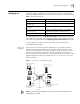
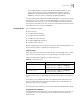
Tab le 11 Tag Packet Priority
Operation Command
Mark the packet priority traffic-priority outbound { ip-group { acl-number |
acl-name } [ rule rule ] | link-group { acl-number |
acl-name } [ rule rule ] } { [ dscp dscp-value |
ip-precedence pre-value ] [ local-precedence pre-value
] }
Cancel the packet priority marking undo traffic-priority { ip-group { acl-number |
acl-name } [ rule rule ] | link-group { acl-number |
acl-name } [ rule rule ] }
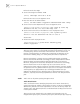
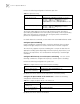
Tab le 12 Configure which Priority is Used for Queue Scheduling
Operation Command
Configure which priority is
used for queue scheduling
priority-trust { dscp | ip-precedence | cos |
local-precedence }
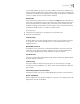
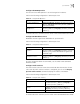
Tab le 13 Configure the Queue Mode of the Switch Port
Operation Command
Configure the Queue Mode of
the Switch Port
queue-scheduler { 0 | 1 | 2 }
Restore the default Queue
Mode of the Switch Port
undo queue-scheduler