
Switch 7700 Configuration Guide, v2

Displaying and Debugging ACL 193
Displaying and
Debugging ACL
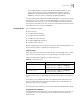
After you configure ACL, execute the display command in all views to display the
running of the ACL configuration, and to verify the effect of the configuration.
Execute the reset command in user view to clear the statistics of the ACL module.
The matched information of the display acl config command specifies the rules
treated by the switch’s CPU. The matched information of the transmitted data by
the switch can be displayed with the display qos-info traffic-statistic command.
For a description of the syntax of these commands, see the Switch 7700
Command Reference Guide.
Example: ACL
Configuration
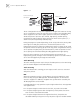
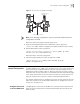
The interconnection between different departments on a company network is
implemented through the 100M ports of the Switch 7700. The payment query
server of the Financial Dept. is accessed through Ethernet1/0/1 (at 129.110.1.2).
The ACL must be properly configured to prevent departments other than the
Office of President from having access to the payment query server between 8:00
AM and 6:00 PM. The Office of President (at 129.111.1.2) can access the server
without limitation.
Figure 1 Access Control Configuration Example
Note: In the following configuration steps, only the commands related to ACL
configurations are listed.
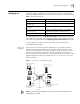
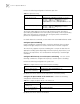
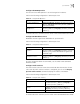
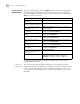
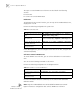
Table 9 Display and Debug ACL
Operation Command
Display the status of the time range display time-range [ all | name ]
Display the detail information
about the ACL
display acl config { all | acl-number | acl-name }
Display the ACL mode chosen by
the switch
display acl mode
Display the information about the
ACL running state
display acl running-packet-filter { all | interface {
interface-name | interface-type interface-num } }
Clear ACL counters reset acl counter { all | acl-number | acl-name }
#3
#4
#1
#2
Switch
Office of President
129.111.1.2
Pay query server
129.110.1.2
Administration Department
subnet address
10.120.0.0
Connected to
a router
Financial Department
subnet address
10.110.0.0