
Switch 7700 Configuration Guide, v2

12 CHAPTER 1: SYSTEM ACCESS
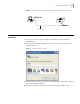
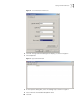
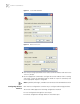
Figure 12 Set the Dialed Number
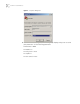
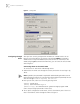
Figure 13 Dial the Remote PC
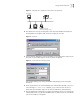
4 Enter the preset login password on the remote terminal emulator and wait for the
<SW7700> prompt.
5 Use the appropriate commands to configure the Switch 7700 or view its running
state. Enter
? to get the immediate help. For details on a specific command, refer
to the appropriate chapter in this guide.
Note: By default, after login, a modem user can access the commands at Level 0.
Configuring the User
Interface
User interface configuration is another way to configure and manage port data.
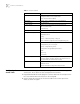
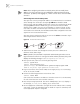
The Switch 7700 supports the following configuration methods:
■ Local configuration through the console port
■ Remote configuration through Telnet on the Ethernet port