
Switch 7700 Configuration Guide, v2


190 CHAPTER 7: QOS/ACL OPERATION
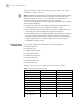
Perform the following configuration in system view.
The Switch 7700 uses ip-based mode and the L3 traffic classification rule by
default.
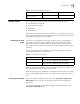
Defining ACL The Switch 7700 supports several kinds of ACLs. to define the ACL:
1 Enter the corresponding ACL view
2 Add a rule to the ACL
You can add multiple rules to one ACL.
Note: If a specific time range is not defined, the ACL always functions after it is
activated.
During the process of defining the ACL, you can use the rule command several
times to define multiple rules for an ACL.
If ACL is used to filter or classify the data transmitted by the hardware of the
switch, the match order defined in the acl command is not effective. If ACL is used
to filter or classify the data treated by the software of the switch, you can
determine the match order for the ACL sub-rules. After you specify the
match-order of an ACL rule, you cannot modify it later.
The default matching-order of ACL follows the order that is configured by the
user.
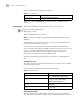
Defining Basic ACL
The rules of the basic ACL are defined on the basis of the Layer 3 source IP address
to analyze the data packets.
Perform the following configuration in the designated view.
Define Advanced ACL
The classification rules for advanced ACL are defined on the basis of attributes
such as source and destination IP address, the TCP or UDP port number in use, and
Tab le 3 Select ACL Mode
Operation Command
Select ACL mode acl mode { ip-based | link-based }
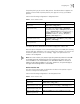
Tab le 4 Define Basic ACL
Operation Command
Enter basic ACL view (from system view) acl { number acl-number | name acl-name
basic } [ match-order { config | auto } ]
Add a sub-item to the ACL (from basic ACL
view)
rule [ rule-id ] { permit | deny } [ source
source-addr source-wildcard | any ] [
fragment ] [ time-range name ]
Delete a sub-item from the ACL (from basic
ACL view)
undo rule rule-id [ source ] [ fragment ] [
time-range ]
Delete one ACL or all the ACL (from system
view)
undo acl { number acl-number | name
acl-name | all }