
Switch 7700 Configuration Guide, v2


Configuring ACL 189
Configuring ACL ACL configuration includes the tasks described in the following sections:
■ Configuring the Time Range
■ Selecting the ACL Mode
■ Defining ACL
■ Activating ACL
These steps must be done in sequence. Configure the time range first, then select
the ACL mode and define the ACL (using the defined time range in the definition),
followed by activating the ACL to validate it.
Configuring the Time
Range
The process of configuring a time-range includes the steps of configuring the
hour-minute range, date ranges and period range. The hour-minute range is
expressed in the units of minutes and hour. The date range is expressed in the
units of date, month, and year. The periodic time range is expressed by the day of
the week.
You can use the following command to set the time range by performing the
following configuration in the system view.
When the start-time and end-time are not configured, they are set to define one
day. The end time must be later than the start time.
When the end-date is not configured, it will be all the time from now to the date,
which can be displayed by the system. The end time must be later than the start
time.
Selecting the ACL Mode The Switch 7700 can only have one of two modes, ip-based or link-based. In
link-based mode, only L2 ACL can be defined, activated, and cited by other
applications.
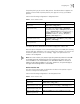
You can use the following command to configure a traffic classification rule in
ip-based or link-based mode.
Maximum sub items for all
ACL ( for Salience II )
- 1536
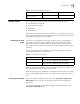
Table 1 Quantitative Limitation to the ACL
Item Value range Maximum
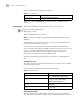
Table 2 Set the Absolute Time Range
Operation Command
Set the absolute time range time-range time-name [ start-time to end-time ] [
days-of-the-week ] [ from start- date] [to end-date ]
Delete the absolute time range undo time-range time-name [ start-time to end-time ] [
days-of-the-week ] [ from start- date] [to end-date ]