
Switch 7700 Configuration Guide, v2

Setting Terminal Parameters 11
Configuring Through a
Dial-up the Modem
To configure your router through a dial-up modem:
1 Authenticate the modem user through the console port of the Switch 7700 before
the user logs in to the switch through a dial-up modem.
Note: By default, the password is required for authenticating the modem user to
log in to the Switch 7700. If a user logs in through the modem without a
password, the user sees the message,
Password required, but none set.
a Enter system view, return user view with Ctrl+Z.
<SW7700> system-view
[SW7700] user-interface aux 0
[SW7700-ui-aux0] set authentication password simple/cipher xxxx
(xxxx is the preset login password of the Modem user.)
b Using the modem command, you can configure the console port as in modem
mode.
[SW7700-ui-aux0] modem
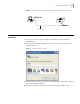
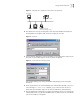
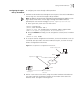
2 To set up the remote configuration environment, connect the modems to a PC (or
a terminal) serial port and to the Switch 7700 console port, as shown in
Set Up
Remote Configuration Environment.
Figure 11 Set Up Remote Configuration Environment
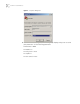
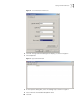
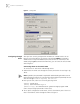
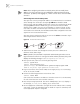
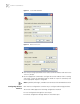
3 Dial for a connection to the switch, using the terminal emulator and modem on
the remote end. Dial the telephone number of the modem connected to the
Ethernet switch. See
Figure 12 and Figure 13.
Console port
Remote telephone:
555-5555
Modem
Modem
PST
Telephone line
Modem serial port line