
Switch 7700 Configuration Guide, v2



124 CHAPTER 5: ROUTING PROTOCOL OPERATION
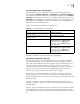
Removing Private AS Numbers While Transmitting BGP Update
Messages
Generally, the AS numbers (public AS numbers or private AS
numbers) are included in the AS paths while transmitting BGP update messages.
This command is used to configure certain outbound routers to ignore the private
AS numbers while transmitting update messages.
By default, the private AS numbers are included while transmitting BGP update
messages.
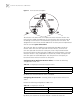
Specify the Source Interface of a Route Update Packet Generally, the
system specified the source interface of a route update packet. When the interface
fails to work, in order to keep the TCP connection valid, the interior BGP session
can be configured to specify the source interface. This command is usually used
the loopback interface.
By default, BGP carries out TCP connection with the optimal source interface.
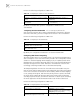
Enabling or Disabling a Peer or Peer Group The BGP speakers do not
exchange routing information with the disable peer or peer group.
Perform the following configurations in BGP view.
By default, a peer or peer group is enabled.
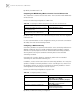
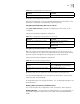
Configuring a BGP Timer
When receiving an OPEN message to set up a BGP connection, a BGP speaker
needs to calculate a hold timer. The negotiated hold timer is the speaker’s own
hold time or the one received in the message, whichever is smaller. Then, BGP will
send a KeepAlive message and set a KeepAlive timer. If the negotiation result is 0,
no keepalive message will be transmitted and whether the hold-time has timed
out will not matter.
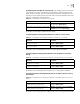
Tab le 100 Removing Private AS Numbers While Transmitting BGP Update Messages
Operation Command
Remove private AS numbers while
transmitting BGP update messages
peer { peer-address | group-name } public-as-only
Include private AS numbers while transmitting
BGP update messages
undo peer { peer-address | group-name }
public-as-only
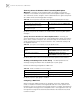
Tab le 101 Specify the Source Interface of a Route Update Packet
Operation Command
Specify the source interface of a route update
packet
peer { peer-address | group-name }
connect-interface interface-type interface-name
Use the best source interface undo peer { peer-address | group-name }
connect-interface interface-type interface-name
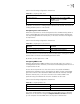
Tab le 102 Enable or Disable a Peer or Peer Group
Operation Command
Enable a peer/peer group peer { group-name | peer-address } enable
Disable a peer/peer group undo peer { group-name | peer-address } enable