
Switch 7700 Configuration Guide, v2


BGP 119
■ Configuring BGP Route Summarization
■ Configuring an BGP Route Reflector
■ Configuring BGP AS Confederation Attributes
■ Configuring BGP Route Dampening
■ Configuring the Repeating Time for a Local AS
■ Configuring the Redistribution of BGP and IGP
■ Defining ACL, AS Path List, and Route Policy
■ Configuring BGP Route Filtering
■ Clearing the BGP Connection
Enabling BGP
To enable BGP, local AS number should be specified. After the enabling of BGP,
local router listens to BGP connection requests sent by adjacent routers. To make
the local router send BGP connection requests to adjacent routers, refer to the
configuration of the peer command. When BGP is disabled, all established BGP
connections will be disconnected.
Perform the following configurations in system view.
By default, BGP is not enabled.
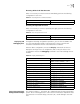
Configuring Networks for BGP Distribution
Perform the following configurations in BGP view.
By default, no network is configured for BGP distribution.
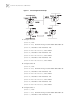
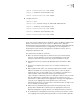
Configuring a BGP Peer Group
BGP speakers exchanging BGP packets compose BGP peers. To configure multiple
peers to use same route update policy, users may distribute them to a BGP peer
group to facilitate the configuration.
In the case of any change in the configuration of the group, configuration of each
group member changes accordingly. Users may, however, configure certain
attributes for certain member by designating its IP address so that the member is
not affected by the group’s configuration in terms of these attributes.
Table 84 Enable/Disable BGP
Operation Command
Enable BGP and enter the BGP view bgp as-number
Disable BGP undo bgp [ as-number ]
Table 85 Configure Networks for BGP Distribution
Operation Command
Configure the local network route network ip-address address-mask [
route-policy route-policy-name ]
Remove the local network route undo network ip-address address-mask [
route-policy route-policy-name ]