
Switch 7700 Configuration Guide, v2


114 CHAPTER 5: ROUTING PROTOCOL OPERATION
Configuring IS-IS Route Filtering
The IS-IS protocol can filter the received and distributed routes according to the
access control list specified by acl-number.
Perform the following configurations in IS-IS view.
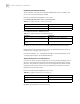
■ Configure filtering of the routes received by IS-IS .
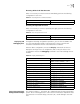
■ Configure to filter the distributed routes.
By default, IS-IS will not filter the received and distributed routing information.
Protocol specifies the routing protocol sources for distributing routes, which can
be direct, static, rip, bgp, ospf, or ospf-ase.
For more information, see “Configuring Filtering for the Received Routes” and
“Configuring Filtering for the Distributed Routes ”.
Setting the Preference of IS-IS Protocol
In a router on which several routing protocols are concurrently operating, there is
an issue of sharing and selecting the routing information among all the routing
protocols. The system sets a preference for each routing protocol. When various
routing protocols find the route to the same destination, the protocol with the
higher preference will take effect.
Perform the following configurations in IS-IS view..
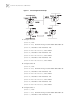
By default, the preference of IS-IS route is 15.
Tab le 78 Configure Filtering of the Received Routes
Operation Command
Configure to filter the received routes filter-policy acl-number import
Configure not to filter the received routes undo filter-policy acl-number import
Tab le 79 Configure Filtering of the Distributed Routes
Operation Command
Configure to filter the routes distributed by
IS-IS
filter-policy acl-number out protocol
Configure not to filter the routes distributed
by IS-IS
undo filter-policy acl-number out protocol
Tab le 80 Configure the Preference of IS-IS Protocol
Operation Command
Configure the preference of IS-IS protocol preference value
Restore the default preference of IS-IS
protocol
undo preference