
Switch 7700 Configuration Guide, v2



IS-IS 111
Setting Peer Change Logging
After peer changes log is enabled, the IS-IS peer changes will be output on the
configuration terminal until the log is disabled.
Perform the following configurations in IS-IS view..
By default, the peer changes log is disabled.
Setting the LSP Refresh Interval
In order to ensure that the LSPs in the whole area can maintain the
synchronization, all the current LSPs will be transmitted periodically.
Perform the following configurations in IS-IS view..
By default, LSP is refreshed every 900 seconds (15 minutes).
Setting the Lifetime of LSP
When a router generates the LSP of the system, it will fill in the maximum lifetime
of this LSP. When other routers receive this LSP, its life time will be reduced
continuously as the time goes. If updated LSP has not been received before the old
one times out, this LSP will be deleted from the LSDB.
Perform the following configurations in IS-IS view..
By default, LSP can live for 1200 seconds (20 minutes).
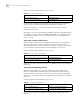
Setting the SPF Calculation in Slice
When there is a large number of routes in the routing table (over 150,000), SPF
calculation of IS-IS may occupy the system resources for a long time. To prevent
such a case, SPF calculation can be set to perform in slice.
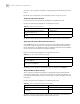
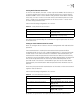
Table 70 Set to Log the Peer Changes
Operation Command
Enable peer changes log log-peer-change
Disable peer changes log undo log-peer-change
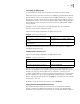
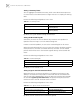
Table 71 Set LSP Refresh Interval
Operation Command
Set LSP refresh interval timer lsp-refresh seconds
Restore the default LSP refresh interval undo timer lsp-refresh
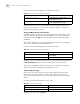
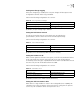
Table 72 Set Lifetime of LSP
Operation Command
Set lifetime of LSP timer lsp-max-age seconds
Restore the default LSP lifetime undo timer lsp-max-age