
Switch 7700 Configuration Guide, v2

110 CHAPTER 5: ROUTING PROTOCOL OPERATION
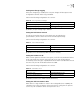
Setting a Summary Route
You can aggregate several different routes, which turns advertisement processes
of several routes to the advertisement of single route so as to simplify the routing
table.
Perform the following configurations in IS-IS view..
By default, the system disables routing summarization.
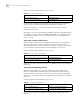
Setting the Overload Flag Bit
Sometimes, the router in the IS-IS domain may encounter some problems in
operation thus error may occur in the whole routing area.
In order to avoid this problem, we can set the overload flag bit for this router.
When the overload threshold is set on a router, other routers should not send this
router packets for the router to forward. However, the router can still forward
packets which will be sent to the network segment directly connected with this
router.
Perform the following configurations in IS-IS view..
By default, no over load bit is set.
Setting to Ignore the LSP Checksum Errors
When the local IS-IS receives an LSP packet, it will perform checksum to it. By
default, if the checksum in the packet is inconsistent with the calculated check
sum, the LSP will be dropped. But if we set to ignore the checking error through
the command ignore-lsp-checksum-error, this packet will be processed as a
normal one even if the LSP checksum errors are found.
Perform the following configurations in IS-IS view..
By default, the LSP checksum errors will not be ignored.
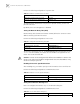
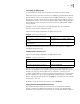
Tab le 67 Set Summary Route
Operation Command
Set summary route summary ip-address ip-mask [ level-1 |
level-1-2 | level-2 ]
Delete the summary route undo summary ip-address ip-mask [ level-1 |
level-1-2 | level-2 ]
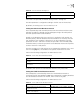
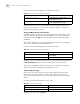
Tab le 68 Set Overload Flag Bit
Operation Command
Set overload flag bit set-overload
Remove the overload flag bit undo set-overload
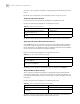
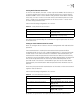
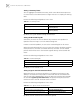
Tab le 69 Set to Ignore the LSP Checksum Errors
Operation Command
Set to ignore the LSP checksum errors ignore-lsp-checksum-error
Set not to ignore the LSP checksum errors undo ignore-lsp-checksum-error