
Switch 7700 Configuration Guide, v2

108 CHAPTER 5: ROUTING PROTOCOL OPERATION
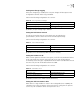
Perform the following configurations in VLAN interface view..
By default, the interface is not configured with any authentication password or
performs authentication. If the level is not specified, it defaults to setting the
authentication password of Level-1.
Setting the Mesh Group of the Interface
On NBMA network, the interface of a router will flood the received LSP to other
interfaces. However, this processing method applied to a network with higher
connectivity and several p2p links will cause repeated LSP flooding and waste
bandwidth.
To avoid such problem, you can configure several interfaces into a mesh group.
The interface will flood it outside the group only.
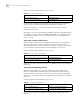
Perform the following configurations in VLAN interface view..
By default, the LSP is flooded normally from the interface. When configured with
the
mesh-blocked parameter, it will not flood the LSP to other interfaces.
Thus the
IS-IS configuration tasks on the interface are finished. The following
sections discuss how to configure other parameters of IS-IS.
Setting the Router Type
Users can set the levels of the current router. Based upon the position of the
router, the levels can be divided into Level-1 (intra-domain router), Level-2
(inter-domain router) and Level-1-2 (intra-domain router as well as inter-domain
router).
Perform the following configurations in IS-IS view..
By default, the router type is level-1-2.
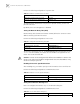
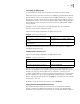
Tab le 62 Set Interface Authentication Password
Operation Command
Set authentication password isis authentication-mode { simple | md5 } password
[ { level-1 | level-2 } [ ip | osi ] ]
Delete authentication-mode password undo isis authentication-mode { simple | md5 }
password [ { level-1 | level-2 } [ ip | osi ] ]
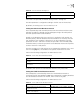
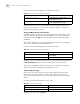
Tab le 63 Set the Mesh Group of the Interface
Operation Command
Add an interface to a mesh group. isis mesh-group { mesh-group-number |
mesh-blocked }
Remove the interface from the mesh group undo isis mesh-group
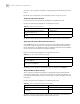
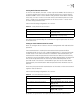
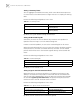
Tab le 64 Setting the Router Type
Operation Command
Set router type is-level { level-1 | level-1-2 | level-2 }
Restore the default router type undo is-level