
Switch 7700 Configuration Guide, v2

IS-IS 107
Set Priority for DIS Election
In the broadcast network, the IS-IS needs to elect a DIS from all the routers.
When you need to select a DIS from the IS-IS neighbors on the broadcast network,
you should select level-1 DIS and level-2 DIS. The higher the priority is, the more
possible it is selected. If there are two or more routers with the highest priority in
the broadcast network, the one with the greatest MAC address will be selected. If
all the adjacent routers' priorities are 0, the one with the greatest MAC address
will be selected.
The DISs of Level-1 and Level-2 are elected separately. You can set different
priorities for DIS election at different levels.
Perform the following configurations in VLAN interface view..
By default, the interface priority is 64. If the level is not specified, it defaults to
setting the priority of Level-1.
Setting Interface Circuit Level
Perform the following configurations in VLAN interface view..
You can set the circuit level to limit what adjacency can be established for the
interface. For example, Level-1 interface can only have Level-1 adjacency. Level-2
interface can only have Level-2 adjacency. For the Level-1-2 router, you can
configure some interfaces to Level-2 to prevent transmitting Level-1 Hello packets
to Level-2 backbone so as to save the bandwidth. However Level-1 and Level-2
use the same kind of Hello packet over the p2p link, and therefore such setting is
unnecessary in this case.
By default, the circuit-level on the interface route is level-1-2.
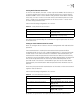
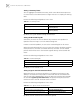
Setting Interface Authentication Password
The authentication password set on the interface is mainly used in the Hello
packet to confirm the validity and correctness of its peers. The authentication
passwords at the same level of all the interfaces of a network should be identical.
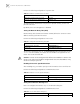
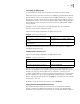
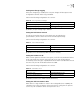
Table 60 Set Priority for DIS Election
Operation Command
Set the priorities for DIS election on the
interface
isis dis-priority value [ level-1 | level-2 ]
Restore the default priorities for DIS election
on the interface
undo isis dis-priority [ level-1 | level-2 ]
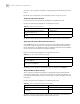
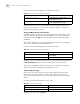
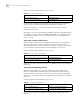
Table 61 Set Interface Circuit Level
Operation Command
Set interface circuit level isis circuit-level [ level-1 | level-1-2 | level-2
]
Restore the default interface circuit level undo isis circuit-level