
Switch 7700 Configuration Guide, v2

104 CHAPTER 5: ROUTING PROTOCOL OPERATION
Perform the following configurations in system view.
The
tag parameter identifies the IS-IS process. In present version, just one IS-IS
process is allowed.
By default, the IS-IS routing process is disabled.
Setting the Network Entity Title (NET)
Network Entity Titles (hereafter referred to as NETs) defines the current IS-IS area
address and the system ID of the router.
Perform the following configurations in IS-IS view.
The format of parameter net is X…X.XXXXXXXXXXXX.XX, among which the first
“X
…X” is the area address, the twelve Xs in the middle is the System ID of the
router. The last XX should be 00.
Caution: A router can be configured with different area addresses. However the
routers in the same area should be configured with the same area address. Every
router has a unique System ID.
Enabling IS-IS on the Specified Interface
After enabling IS-IS, you need to specify on which Interfaces the IS-IS will be run.
Perform the following configurations in VLAN interface view..
Setting IS-IS Link State Routing Cost
Users can configure the Interface cost, i.e. the default routing cost.
Perform the following configurations in VLAN interface view..
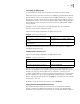
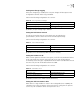
Tab le 51 Enable IS-IS and Enter the IS-IS View
Operation Command
Enable the IS-IS and enter the IS-IS view isis [ tag ]
Cancel the specified IS-IS routing process undo isis [ tag ]
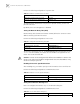
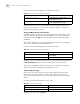
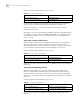
Tab le 52 Setting the Network Entity Title (NET)
Operation Command
Set Network Entity Title (NET) network-entity net
Delete a NET undo network-entity net
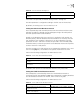
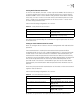
Tab le 53 Enable IS-IS on the Specified Interface
Operation Command
Enable IS-IS on the specified Interface isis enable [ tag ]
Cancel this designation undo isis enable [ tag ]
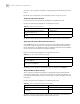
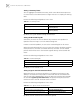
Tab le 54 Set IS-IS Link State Routing Cost
Operation Command
Set the routing cost of the interface isis cost value [ level-1 | level-2 ]