
Switch 7700 Configuration Guide, v2

94 CHAPTER 5: ROUTING PROTOCOL OPERATION
Perform the following configuration in OSPF view.
By default, all the interfaces are allowed to transmit and receive OSPF packets.
After an OSPF interface is set to silent status, the interface can still advertise its
direct route. However, the OSPF calling packets of the interface are blocked, and
no neighboring relationship can be established on the interface. This enhances
OSPF’s ability to adapt to the network, which reduces the consumption of system
resources.
Reset the OSPF Process
If the undo ospf command is executed on a router and then the ospf command
is used to restart the OSPF process, the previous OSPF configuration is lost. With
the reset ospf all command, you can restart the OSPF process without losing the
previous OSPF configuration.
Perform the following configuration in user view.
Resetting the OSPF process can immediately clear the invalid LSAs, make the
modified Router ID effective or re-elect the DR and BDR.
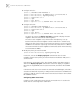
Display and Debug OSPF After configurating OSPF, execute the display command in all views to display the
running of the OSPF configuration, and to verify the effect of the configuration.
Execute the debugging command in user view to debug the OSPF module.
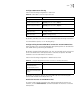
Tab le 48 Disable the Interface to Send OSPF Packets
Operation Command
Disable the interface to send OSPF
packets
silent-interface silent-interface-type
silent-interface-number
Enable the interface to send OSPF
packets
undo silent-interface silent-interface-type
silent-interface-number
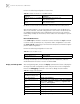
Tab le 49 Reset the OSPF Process
Operation Command
Reset the OSPF process reset ospf all
Tab le 50 Display and Debug OSPF
Operation Command
Display the brief information
of the OSPF routing process
display ospf brief
Display OSPF statistics display ospf cumulative
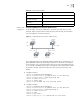
Display LSDB information of
OSPF
display ospf [ area-id ] lsdb [ brief ] [ asbr | ase | network |
nssa | router | summary ] [ ip-address ] [ originate-router
ip-address ] [ self-originate ]
Display OSPF peer information display ospf peer [ brief ]
Display OSPF next hop
information
display ospf nexthop
Display OSPF routing table display ospf routing
Display OSPF virtual links display ospf vlink
Display OSPF request list display ospf request-queue