
H3C LSW1FC4P0 Interface Card for S5820X-28C Ethernet Switches QuickTools User Guide Firmware Version 9.0.7


Managing Ports
Viewing and Configuring Ports
80 59273-00 C
Port Speeds
The external ports can support 1Gbps, 2Gbps, 4Gbps, or 8Gbps. Internal ports
are 10Gbps and can not be changed. Auto-detect is not an option on internal
ports. To display the speed of each port, open the View menu and select View
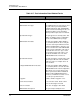
Port Speeds. Table 3-22 lists the possible port speeds.
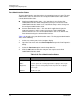
To change the port transmission speed, do the following:
1. Select one or more ports in the faceplate display.
2. Open the Port menu and select Port Properties to open the Port Properties
dialog.
3. Select the Port Speed option from the drop-down list.
4. Click the OK button to write the new port speed to the H3C LSW1FC4P0
Interface Card.
Port Transceiver Media Status
To display transceiver media status, open the View menu and select View Port
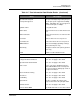
Media. Table 3-23 lists the port media states and their meanings.
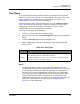
Table 3-22. Port Speeds
State Description
Auto-Detect Matches the transmission speed of the connected device. This is the
default. Applies to external ports only.
2Gbps Sets the transmission speed to 2Gbps (on external ports only.
4Gbps Sets the transmission speed to 4Gbps (on external ports only.
8Gbps Sets the transmission speed to 8Gbps (on external ports only.
10Gbps The transmission speed for (internal or external) ports configured as
PT ports, or internal ports configured as a TH port.