
H3C LSW1FC4P0 Interface Card for S5820X-28C Ethernet Switches QuickTools User Guide Firmware Version 9.0.7


Managing Ports
Viewing and Configuring Ports
59273-00 C 77
Internal Port Operational States
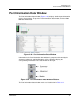
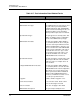
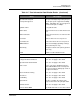
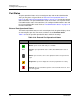
The operational states on the internal ports in the faceplate display are described
in Table 3-19.
Table 3-19. Internal Port Operational States
State Description
Logged In — DCBX enabled. The Port SyncStatus has been acquired,
and Port Link State is "Active".
Logged In—DCBX not enabled
Down—Both sides always red if the Port's operational State is "Down"
Testing (Diagnostics)—Always displayed for internal ports if Opera-
tion State is "Diagnostic" or "Test"
Other—DCBX enabled. The Port SyncStatus has been acquired, and
Port Link State is "Active".
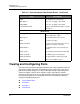
Other—DCBX enabled. The Port SyncStatus has been acquired, but
Port Link State is NOT Active.
Other—One of the following:
DCBX enabled. The Port SyncStatus is NOT Acquired
DCBX not enabled, or any other case not above.