
H3C LSW1FC4P0 Interface Card for S5820X-28C Ethernet Switches QuickTools User Guide Firmware Version 9.0.7


Managing Ports
Viewing and Configuring Ports
59273-00 C 75
Port Transceiver Media Status
Device Scan
DCBX
PFC Priority
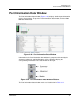
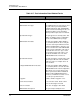
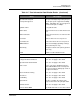
The port settings or characteristics are configured using the Port Properties dialog
(Figure 3-40). To open the Port Properties dialog, select one or more ports, open
the Port menu and select Port Properties.
Figure 3-40. Port Properties Dialog
Port Symbolic Name
To change the symbolic name of a port, do the following:
1. Open the faceplate display and select a port.
2. Open the Port menu and select Port Properties to open the Port Properties
dialog.
3. Click inside the Symbolic Name field, and enter a new name for the port in
the port symbolic name.
4. Click the OK button.
NOTE:
Use the Select to Propagate Changes to Entire Column options to
propagate the same change to all selected ports, select the options before
making a change to a port.