
H3C LSW1FC4P0 Interface Card for S5820X-28C Ethernet Switches QuickTools User Guide Firmware Version 9.0.7


Managing Ports
Viewing and Configuring Ports
74 59273-00 C
Viewing and Configuring Ports
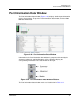
Port color and text provide information about the port and its operational state. To
display port number and status information for a port, position the cursor over a
port on the faceplate display. The status information changes depending on the
View menu option selected. Green indicates active; gray indicates inactive.
Context-sensitive popup menus are displayed when you right-click a port icon in
the faceplate display. Use the drop-down lists in the Port Properties dialog to
change the following parameters:
Port Symbolic Name
Port States
Port Types
Port Speeds
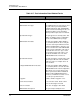
VLAN The VLAN for the selected port
MAC Address N/A - does not apply to this switch
Fabric WWN N/A - does not apply to this switch
Login Limit Exceeded Indicates if the maximum number of logins
is reached
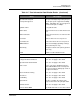
Media Group
Media Type The transceiver fibre type, such as single
mode, multi-mode, copper.
Media Speed The maximum transceiver speed
Media The transceiver type.
Media Transmitter The transceiver transmitter type, such as
longwave, shortwave, electrical.
Media Distance The maximum transceiver transmission
distance
Media Vendor The company that manufactured the SFP
Media Vendor ID The IEEE registered company ID
Media Part Number The part number assigned to the SFP
Media Revision Transceiver hardware version
Table 3-17. Port Information Data Window Entries (Continued)
Entry Description