
H3C LSW1FC4P0 Interface Card for S5820X-28C Ethernet Switches QuickTools User Guide Firmware Version 9.0.7



59273-00 C 63
3 Managing Ports
The data windows provide port information and port statistics for selected ports.
This section describes the following tasks that manage ports and devices:
Port Statistics Data Windows
Port Information Data Window
Viewing and Configuring Ports
Resetting a Port
Testing Ports
Mapping Ports
Port Statistics Data Windows
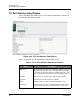
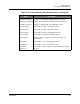
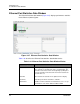
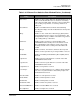
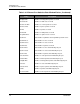
Port statistics data windows display statistics about port performance. There are
two port statistics data windows: FC Port Stats and Ethernet Port Stats.
To open the Port Statistics data window, select one or more ports and click the FC
Port Stats or Ethernet Port Stats data window tab.
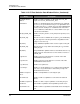
The Statistics drop-down list is available on the Port Statistics data window, and
provides different ways to view detailed port information. Click the down arrow to
open the drop-down list. Open the drop-down list and select Absolute to view the
total count of statistics since the last H3C LSW1FC4P0 Interface Card or port
reset. Select Rate to view the number of statistics counted per second over the
polling period. Select Baseline to view the total count of statistics since the last
time the baseline was set. When viewing baseline statistics, click the Clear
Baseline button to set the current baseline. The baseline will also be set when the
H3C LSW1FC4P0 Interface Card status changes from unreachable to reachable.