
H3C LSW1FC4P0 Interface Card for S5820X-28C Ethernet Switches QuickTools User Guide Firmware Version 9.0.7


Managing H3C LSW1FC4P0 Interface Card
Configuring an H3C LSW1FC4P0 Interface Card
36 59273-00 C
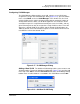
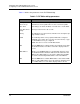
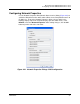
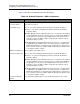
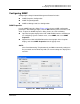
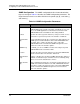
Table 2-7 defines the parameters in the FCF Editor dialog.
Table 2-7. FCF Editor dialog parameters
Parameter Description
FCmap Name A user-defined name consisting of 6 hexadecimal characters
Enforce Keep
Alive Timer
Determines if the Keep Alive Timer is enforced. The Keep Alive
Timer Range can still be modified, even if this box is not modified.
Keep Alive Timer
Range
An integer value from 0 to 90 seconds
Priority The FIP Priority is a value from 0 to 255 where 0 is the highest pri-
ority, and 255 is lowest.
VLAN The VLAN drop down comes populated with all the configured
VLAN IDs on the switch. The user may select from the list, or type
in a VLAN ID that is not yet configured.
NOTE: This does not create a VLAN with that ID.
Add Click the Add button to add the VLAN to the VLAN list for the FCF.
The maximum number of VLANs for the FCF is displayed above
the list.
MAC Address Allows you to add MAC addresses (hexidecimal characters only).
The maximum number allowed is indicated in the label above the
MAC list. The MAC addresses entered are displayed in the MAC
list and are automatically delimited with colons in the MAC list.
Add Click the Add button to add the MAC address entered in the MAC
Address field to MAC address list for the FCF. The maximum num-
ber of MAC addresses for the FCF is displayed above the list.