
H3C LSW1FC4P0 Interface Card for S5820X-28C Ethernet Switches QuickTools User Guide Firmware Version 9.0.7





Managing H3C LSW1FC4P0 Interface Card
Paging an H3C LSW1FC4P0 Interface Card
24 59273-00 C
5. Enter a value for the rising trigger. A rising trigger alarm is generated when
the event count per interval exceeds the rising trigger. The interface card will
not generate another rising trigger alarm for that event until the count
descends below the falling trigger and rises again above the rising trigger.
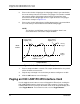
Consider the example in Figure 2-13.
6. Enter a value for the falling trigger. A falling trigger alarm is generated when
the event count per interval descends below the falling trigger.
Figure 2-13 Port Threshold Alarm Example
7. Enter a sample window in seconds. The sample window defines the period
of time in which to count events.
8. Repeat steps 3 through 7 for each alarm you want to configure or enable.
9. Click the OK button to save all changes.
Paging an H3C LSW1FC4P0 Interface Card
Use the toggle beacon feature to cause all Logged-In LEDs to flash, making the
H3C LSW1FC4P0 Interface Card easier to visually recognize. To page an H3C
LSW1FC4P0 Interface Card, open the Switch menu in the faceplate display and
select Toggle Beacon. To cancel the beacon, reselect Toggle Beacon.
NOTE:
The interface card will down a port if a rising trigger alarm is not
cleared after three consecutive sample windows.
Rising
Trigger
Falling
Trigger
Event
Count
Sample Window
Generate falling
trigger alarm;
eligibility is reset
Generate rising
trigger alarm;
eligibility ends
Generate rising
trigger alarm;
eligibility ends