
H3C LSW1FC4P0 Interface Card for S5820X-28C Ethernet Switches Command Line Interface Guide Firmware Version 9.0.7

Port Configuration
Modifying Port Operating Characteristics
59272-00 C 87
You can configure external ports (1, 2, 3) as a group based on port 0, or all
internal ports (4–7) based on port 4 using the Clone Config Port command. The
following example configures the external ports based on port 0 and activates the
configuration.
H3C #> admin start
H3C (admin) #> config edit
H3C (admin) #> clone config port 0 1-3
H3C (admin-config) #> config save
The config named default has been saved.
H3C (admin) #> config activate
The currently active configuration will be activated.
Please confirm (y/n): [n] y
The following example temporarily changes the external port 0 administrative
state to Down:
H3C #> admin start
H3C (admin) #> set port 0 state down
Changing the Port Type
All external ports are configured at the factory as TF_Ports. Furthermore, each
internal TH_Port is mapped to every external port. To reconfigure an external port
as a converged enhanced Ethernet port (PT_Port), you must remove the mapping
for the selected port and change the corresponding internal port type to PT_Port
also. For PT_Port operation, ports are paired as follows:
0 and 4
1 and 5
2 and 6
3 and 7
The following example changes ports 1 and 4 to PT_Port:
1. Enter the Admin Start and Config Edit commands.
H3C #> admin start
H3C (admin) #> config edit
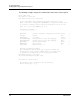
2. Enter the Set Config Port command for ports 4, 5, 6, and 7, and remove
port 1 from the PrimaryTFPortMap and BackupTFPortMap parameters. This
example assumes that there is no backup mapping.
H3C (admin-config) #> set config port 4
.
.