
H3C LSW1FC4P0 Interface Card for S5820X-28C Ethernet Switches Command Line Interface Guide Firmware Version 9.0.7

Switch Module Configuration
Testing a Switch
59272-00 C 75
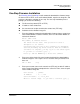
If your workstation has neither an FTP nor a TFTP server, open an
FTP session and download the firmware image file by entering FTP
commands:
>ftp ip_address or switchname
user:images
password: images
ftp>bin
ftp>put filename
ftp>quit
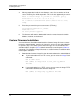
2. Display the list of firmware image files on the Switch Module to confirm that
the file was loaded.
H3C #> admin start
H3C (admin) #> image list
3. Unpack the firmware image file to install the new firmware in flash memory.
H3C (admin) #> image unpack filename
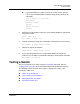
4. Wait for the unpack to complete.
Image unpack command result: Passed
5. A message will prompt you to reset the Switch Module to activate the
firmware. Use the Hotreset command to attempt a non-disruptive activation.
H3C (admin) #> hotreset
Testing a Switch
You can test all ports on a switch using the Test Switch command. Refer to
“Testing a Port” on page 5-92 for information about testing individual and ports.
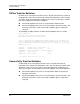
The following sections describe the test types, displaying test status, and
cancelling a switch test:
Offline Tests for Switches
Connectivity Tests for Switches
Displaying Switch Test Status
Canceling a Switch Test