
H3C LSW1FC4P0 Interface Card for S5820X-28C Ethernet Switches Command Line Interface Guide Firmware Version 9.0.7

Switch Module Configuration
Paging a Switch Module
59272-00 C 69
Restoring the Configuration File
The restore operation begins with FTP to upload the configuration file from the
workstation to the Switch Module, then finishes with a Telnet session and the
Config Restore command. To upload the configuration file,
config_switch_169_10112003 in this case, open and FTP session with account
name images and password images. Transfer the file in binary mode with the Put
command as shown:
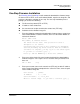
ftp ip_address
user: images
password: images
ftp> bin
ftp> put config_switch_169_10112003 configdata
Local file config_switch_169_10112003
Remote file configdata
ftp>quit
The restore process replaces all configuration information on the Switch Module
and afterwards the Switch Module is automatically reset. To restore the Switch
Module, open a Telnet session, then enter the Config Restore command from
within an Admin session as shown:
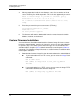
H3C #> admin start
H3C (admin) #> config restore
The switch will be reset after restoring the configuration.
Please confirm (y/n): [n] y
Alarm Msg: [day month date time year][A1005.0021][SM][Configuration is being
restored - this could take several minutes]
Alarm Msg: [day month date time year][A1000.000A][SM][The switch will be reset in
3 seconds due to a config restore]
H3C (admin) #>
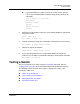
Alarm Msg: [day month date time year][A1000.0005][SM][The switch is being reset]
Paging a Switch Module
To help you locate a particular Switch Module, you can turn on the beacon feature
with the Set Beacon command. This causes all port Logged-In LEDs to flash in
unison, and all port Activity LEDs to illuminate continuously. The following is an
example of how to turn the beacon on and off.
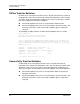
H3C #> set beacon on
H3C #> set beacon off