
H3C LSW1FC4P0 Interface Card for S5820X-28C Ethernet Switches Command Line Interface Guide Firmware Version 9.0.7

Switch Module Configuration
Managing Switch Module Configurations
68 59272-00 C
Back Up and Restore a Switch Module Configuration
Successful management of Switch Modules and fabrics depends on the effective
use of Switch Module configurations. Backing up and restoring a configuration is
useful to protect your work or for use as a template in configuring other Switch
Modules. Backing up and restoring the Switch Module configuration involves the
following:
Creating the Backup File
Downloading the Configuration File
Restoring the Configuration File
Creating the Backup File
The Config Backup command creates a file on the Switch Module, named
configdata. This file can be used to restore a Switch Module configuration only
from the command line interface; it cannot be used to restore a Switch Module
using QuickTools.
H3C #> config backup
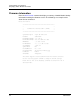
The configdata file contains the following Switch Module configuration information:
All named Switch Module configurations including port, switch, and port
threshold alarm components.
All SNMP and network information defined with the Set Setup command.
Downloading the Configuration File
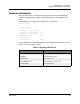
You use FTP to download the configdata file to your workstation for safe keeping
and to upload the file back to the Switch Module for the restore function. To
download the configdata file, open an FTP session on the Switch Module and
login with the account name images and password images. Transfer the file in
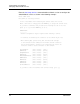
binary mode with the Get command as shown in the following example:
>ftp ip_address
user:images
password: images
ftp>bin
ftp>get configdata
xxxxx bytes sent in xx secs.
ftp>quit
You should rename the configdata file on your workstation with the Switch Module
name and date, config_switch_169_10112003, for example.