
H3C LSW1FC4P0 Interface Card for S5820X-28C Ethernet Switches Command Line Interface Guide Firmware Version 9.0.7



Network and Fabric Configuration
Managing IP Security
59272-00 C 53
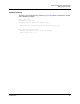
Deleting an Association
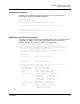
To delete a user-defined association, enter the Ipsec Association Delete
command as shown in the following example:
H3C #> admin start
H3C (admin) #> ipsec edit
H3C (admin-ipsec) #> ipsec association delete association_1
The security association will be deleted. Please confirm (y/n): [n] y
H3C (admin-ipsec) #> ipsec save
The IPsec configuration will be saved and activated.
Please confirm (y/n): [n] y
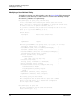
Modifying a User-Defined Association
To modify an existing user-defined association, enter the Ipsec Association Edit
command in an Admin session and an Ipsec Edit session as shown in the
following example. An asterisk (*) indicates a required entry.
H3C (admin-ipsec) #> ipsec association edit h2h-sh-sa
A list of attributes with formatting and current values will follow.
Enter a new value or simply press the ENTER key to accept the current value.
To remove a value for an optional attribute, use ’n’.
If you wish to terminate this process before reaching the end of the list
press 'q' or 'Q' and the ENTER key to do so.
Current Values:
Description Host-to-host: switch->host
.
.
EncryptionKey 123456789012345678901234
New Value (press ENTER to not specify value, 'q' to quit, 'n' for none):
Description (string value, 0-127 bytes) :
*SourceAddress (IPv4, IPv6 or hostname) :
*DestinationAddress (IPv4, IPv6 or hostname) :
*Protocol (1=esp, 2=esp-old, 3=ah, 4=ah-old) : ah
*SPI (decimal value, 256-4294967295) :
Authentication (select an authentication algorithm)
1=hmac-md5 (16 byte key)
2=hmac-sha1 (20 byte key)
3=hmac-sha256 (32 byte key)
4=aes-xcbc-mac (16 byte key)
authentication algorithm choice :
*AuthenticationKey (quotes string or raw hex bytes) :
*Encryption (select an encryption algorithm)
1=des-cbc (8 byte key)
2=3des-cbc (24 byte key)