
H3C LSW1FC4P0 Interface Card for S5820X-28C Ethernet Switches Command Line Interface Guide Firmware Version 9.0.7



Network and Fabric Configuration
Managing IP Security
59272-00 C 51
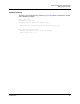
Renaming a User-Defined Policy
To rename a policy (policy_1), enter the Ipsec Policy Rename command as shown
in the following example:
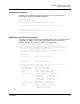
H3C #> admin start
H3C (admin) #> ipsec edit
H3C (admin-ipsec) #> ipsec policy rename policy_1 policy_4
The security policy will be renamed. Please confirm (y/n): [n] y
H3C (admin-ipsec) #> ipsec save
The IPsec configuration will be saved and activated.
Please confirm (y/n): [n] y
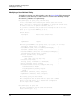
Copying a Policy
You can copy both user-defined and dynamic policies. To copy a policy (policy_1),
enter the Ipsec Policy Copy command as shown in the following example:
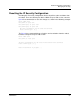
H3C #> admin start
H3C (admin) #> ipsec edit
H3C (admin-ipsec) #> ipsec policy copy policy_1 policy_a
H3C (admin-ipsec) #> ipsec save
The IPsec configuration will be saved and activated.
Please confirm (y/n): [n] y
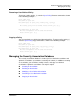
Managing the Security Association Database
The security association database is made up of user-defined associations and
dynamic associations (associations created by the switch). In addition to creating
an association, you can delete, modify, rename, and copy user-defined
associations. Dynamic associations can only be copied.
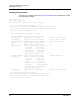
Creating an Association
Deleting an Association
Modifying a User-Defined Association
Renaming a User-Defined Association
Copying an Association