
H3C LSW1FC4P0 Interface Card for S5820X-28C Ethernet Switches Command Line Interface Guide Firmware Version 9.0.7


Network and Fabric Configuration
Configuring Fibre Channel over Ethernet
38 59272-00 C
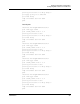
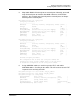
7. Save and activate Switch Module A configuration.
H3C (admin-config) #> config save
H3C (admin) #> config activate
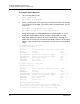
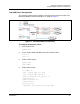
To configure Switch Module B:
1. Open a Config Edit session.
H3C #> admin start
H3C (admin) #> config edit
2. Assign internal ports to VLAN 1002. Because all internal ports (4–7) are
assigned to VLAN 1002 by default, no further configuration is needed.
3. Create VLANs and their corresponding FCFs, and assign the VLANs to the
FCFs. This example uses the default VLAN 1002 and creates VLAN 1003.
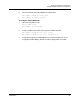
H3C (admin-config) #> fcf 0efc01 create
H3C (admin-config) #> fcf 0efc01 add vlan 1002
H3C (admin-config) #> fcf 0efc02 create
H3C (admin-config) #> vlan 1003 create
H3C (admin-config) #> fcf 0efc02 add vlan 1003
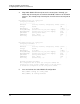
4. Assign internal ports to VLAN 1002 and 1003. Because all internal ports
(4–7) are assigned by default to VLAN 1002 by default, no further
configuration is needed for VLAN 1002.
H3C (admin-config) #> vlan 1003 add port 5