
H3C LSW1FC4P0 Interface Card for S5820X-28C Ethernet Switches Command Line Interface Guide Firmware Version 9.0.7


Network and Fabric Configuration
Configuring Fibre Channel over Ethernet
59272-00 C 33
Two-SAN Fabric Configuration
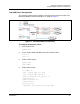
This example explains how to configure connectivity for the Ethernet switch and
two Switch Modules for two SAN fabrics as shown in Figure 2.
Figure 2. Two-SAN Fabric Connectivity
To configure the Ethernet switch:
1. Enter System View.
system-view
2. Create VLANs 1002 and 1003 for the Fibre Channel fabric.
vlan 1002
vlan 1003
3. Enable LLDP function.
system-view
lldp enable
4. Enable APP function.
acl number 4000
rule 0 permit type 8906 ffff
rule 1 permit type 8914 ffff
traffic classifier fcoe operator or
if-match acl 4000
traffic behavior fcoe
remark dot1p 3
qos policy fcoe
classifier fcoe behavior fcoe mode dcbx