
H3C LSW1FC4P0 Interface Card for S5820X-28C Ethernet Switches Command Line Interface Guide Firmware Version 9.0.7


Network and Fabric Configuration
Configuring Fibre Channel over Ethernet
32 59272-00 C
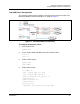
4. Map Switch Module B internal ports to the external ports. Normally, you
would map all internal ports to maximize bandwidth. However for illustration
purposes, this example maps internal ports 4 and 5 each to external ports 0
and 1.
H3C (admin-config) #> set config port 4
Configuring Port Number: 4
------------------------
AdminState (1=Online, 2=Offline, 3=Diagnostics, 4=Down) [Online ]
PortType (PT,TH) [TH ]
EthLinkSpeed (10=10Gb/s) [10Gb/s ]
PrimaryTFPortMap (decimal value for port, N=no mapping) [0,1,2,3 ] 0,1
BackupTFPortMap (decimal value for port, N=no mapping) [None ]
SymPortName (string, max=32 chars) [Port4 ]
DCBXEnabled (True / False) [True ]
PfcPriority (decimal value, 0-7) [3 ]
.
.
.
H3C (admin-config) #> set config port 5
Configuring Port Number: 5
------------------------
AdminState (1=Online, 2=Offline, 3=Diagnostics, 4=Down) [Online ]
PortType (PT,TH) [TH ]
EthLinkSpeed (10=10Gb/s) [10Gb/s ]
PrimaryTFPortMap (decimal value for port, N=no mapping) [0,1,2,3 ] 0,1
BackupTFPortMap (decimal value for port, N=no mapping) [None ]
SymPortName (string, max=32 chars) [Port5 ]
DCBXEnabled (True / False) [True ]
PfcPriority (decimal value, 0-7) [3 ]
Finished configuring attributes.
This configuration must be saved (see config save command) and
activated (see config activate command) before it can take effect.
To discard this configuration use the config cancel command.
5. Save and activate the Switch Module B configuration.
H3C (admin-config) #> config save
H3C (admin) #> config activate