
H3C LSW1FC4P0 Interface Card for S5820X-28C Ethernet Switches Command Line Interface Guide Firmware Version 9.0.7


Network and Fabric Configuration
Configuring Fibre Channel over Ethernet
59272-00 C 27
Removing VLANs from an FCoE Forwarder
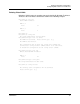
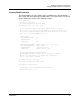
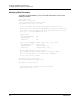
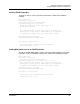
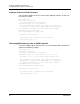
A VLAN can be removed from an FCF as shown in the following example:
H3C #> admin start
H3C (admin) #> config edit
The config named default is being edited.
H3C (admin-config) #> fcf 0efc01 remove vlan 99
VLAN 99 has been removed from FCF 0efc01.
This configuration must be saved (see 'config save' command) and
activated (see 'config activate' command) before it can take effect.
To discard this configuration use the 'config cancel' command.
H3C (admin-config) #> config save
The config named default has been saved.
H3C (admin) #> config activate
The currently active configuration will be activated.
Please confirm (y/n): [n] y
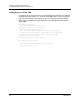
Configuring the Ethernet Switch and the Switch Module
Configuring the Ethernet Switch and the Switch Module for SAN fabric
connectivity involves the following steps:
1. Create VLANs on the Ethernet switch, and assign converged network
adapters (CNAs) and internal ports to the VLANs.
2. Create VLANs and FCFs on the Switch Modules; assign ports to the VLANs;
assign the VLANs to the FCFs, and map internal ports to the TF_Ports.
3. Configure zoning and enable NPIV on the Fibre Channel switches.
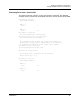
Single SAN Fabric Configuration
This example explains how to configure connectivity for the Ethernet Switch and
two Switch Modules for a single SAN fabric as shown in Figure 1.
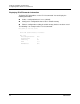
Figure 1. Single-SAN Fabric Connectivity